
This is an old revision of the document!
Table of Contents
MPINO-16A8R
MPINO-16A8R is a all-in-one industrial Arduino with 16 digital inputs and 8 relay outputs. A single PCB integrates 4 analog inputs, interrupt/encoder functions, I²C, and RS-232·RS-485·UART communication.
Program the controller with Arduino IDE (Arduino C/C++) or MPINO STUDIO 2 (Arduino C/C++ & ladder logic).
Use the MPINO-16A8R Arduino IDE getting-started guide to select the board and port and check the first input and output.
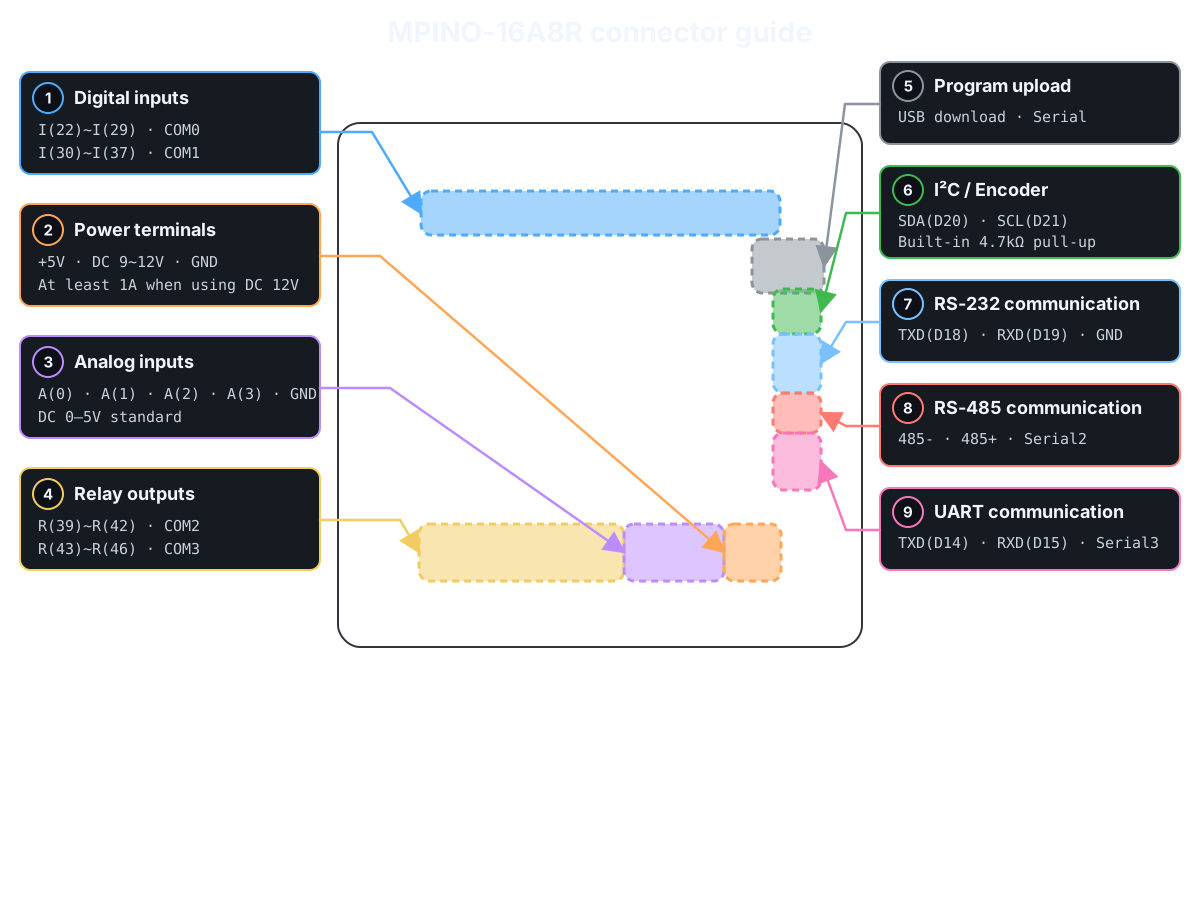
Product Specifications
| Category | Quantity | Terminal / Item | Specifications |
|---|---|---|---|
| Power | - | Supply voltage | DC 9~12V (1A or more when using DC 12V) |
| Digital inputs | 16 points (Solid-state, isolated) | I(22)~I(37) | operating input voltage: DC 0~40V HIGH detection voltage: DC 5V or higher input resistance: 2.2kΩ 8 points/1COM × 2 groups |
| Relay outputs | 8 points (Mechanical contacts, isolated) | R(39)~R(46) | operating connection voltage: DC 0~30V or AC 0~250V maximum allowable output current: 5A/1 points, 15A/1COM 4 points/1COM × 2 groups |
| Analog inputs | 4 points (Non-isolated) | A(0)~A(3) | Standard input: DC 0~5V, 10bit (0~1023) Optional: DC 0~10V, 0(4)~20mA, NTC 10kΩ(25℃) input resistance: 100MΩ(0~5V), 200MΩ(0~10V), 250Ω(0(4)~20mA) |
| Interrupts Encoder | 1 channel (Non-isolated) | SDA(20) SCL(21) | input voltage: DC 0~5V Built-in 4.7kΩ pull-up resistor I²C cannot be used simultaneously with the encoder |
| Communication Channels | 1 channel (Non-isolated) | I²C | I²C master/slave supported Use SDA(20), SCL(21) |
| RS-232 | Use Serial1 Built-in Modbus RTU Master & Slave commands supported Built-in LS Industrial Systems Cnet commands supported |
||
| RS-485 | Use Serial2 Automatic direction control supported Built-in Modbus RTU Master & Slave commands supported Built-in LS Industrial Systems Cnet commands supported |
||
| UART | Use Serial3 Built-in Modbus RTU Master & Slave commands supported Built-in LS Industrial Systems Cnet commands supported |
||
| Memory | - | Flash | 256KB (including 8KB BootLoader) |
| SRAM | 4KB | ||
| EEPROM | 4KB |
Digital inputs
See the one-channel digital-input check before wiring for the first time. →
| Group | Terminal | Arduino Pin | Input Configuration | Terminals and Wiring Example |
|---|---|---|---|---|
| COM0 | I(22)~I(29) | D22~D29 | 8 digital inputs, sharing COM0 |  |
| COM1 | I(30)~I(37) | D30~D37 | 8 digital inputs, sharing COM1 |
The digital inputs are isolated by optocouplers and accept DC 5~24V NPN or PNP signals. Select the input type through the COM0·COM1 wiring polarity.
Example program · digital inputs
Use digitalRead() to display the D22~D37 input states every 200ms. HIGH is 1 and LOW is 0.
void setup() {
  Serial.begin(115200);
}

void loop() {
  for (uint8_t pin = 22; pin <= 37; pin++) {
    Serial.print(F("D"));
    Serial.print(pin);
    Serial.print(F(": "));
    Serial.println(digitalRead(pin));
  }
  delay(200);
}
Related built-in functions
Function example · consecutive-read filter: IdigitalRead()
Function prototype
bool IdigitalRead(uint8_t pin, uint8_t samples);
IdigitalRead(22, 5) reads D22 5 times consecutively. Update the state when all readings are HIGH or all are LOW; mixed readings retain the previous state. Unlike a time-based debounce filter, it inserts no delay between readings.
void setup() {
  Serial.begin(115200);
}

void loop() {
  const bool inputOn = IdigitalRead(22, 5);  // Read D22 five times consecutively and return the stable state
  Serial.println(inputOn ? F("D22 ON") : F("D22 OFF"));
  delay(200);
}
Function example · debouncing: Ibounce(), IbounceOn(), IbounceOff()
Function prototype
bool Ibounce(uint8_t pin, uint32_t debounceTime);
bool IbounceOn(uint8_t pin, uint32_t debounceTime);
bool IbounceOff(uint8_t pin, uint32_t debounceTime);
Compare three filters on the D22 input. Each returns the filtered ON/OFF state.
Ibounce(22, 30): Apply ON and OFF only after they remain stable for at least 30ms.IbounceOn(22, 500): Delay ON by 500ms; apply OFF immediately.IbounceOff(22, 500): Delay OFF by 500ms; apply ON immediately.
Each function operates independently, even on the same pin. Run the filters on every loop() iteration and display only the results at 200ms intervals.
unsigned long lastPrint = 0;

void setup() {
  Serial.begin(115200);
}

void loop() {
  const bool stable = Ibounce(22, 30);  // Filter D22 ON/OFF chatter over 30ms
  const bool onDelayed = IbounceOn(22, 500);  // Delay only D22 ON by 500ms; apply OFF immediately
  const bool offDelayed = IbounceOff(22, 500);  // Delay only D22 OFF by 500ms; apply ON immediately

  if (millis() - lastPrint >= 200) {
    lastPrint = millis();
    Serial.print(F("Ibounce: "));
    Serial.print(stable);
    Serial.print(F(", IbounceOn: "));
    Serial.print(onDelayed);
    Serial.print(F(", IbounceOff: "));
    Serial.println(offDelayed);
  }
}
Function example · input toggle: Ialt()
Function prototype
void Ialt(bool input, bool &state_var);
Ialt(input, state) inverts state whenever the input changes from OFF to ON. Pressing D22 once turns D39 ON; pressing again turns it OFF. Holding the input retains the state. The example debounces the input with Ibounce(22, 30) before passing it to Ialt(). outputOn is a global variable retained between calls, and Ialt() modifies it directly.
bool outputOn = false;

void setup() {
  Serial.begin(115200);
  digitalWrite(39, LOW);
}

void loop() {
  const bool previous = outputOn;
  const bool inputOn = Ibounce(22, 30);  // Filter D22 ON/OFF chatter over 30ms
  Ialt(inputOn, outputOn);  // Invert outputOn on an OFF→ON input transition
  digitalWrite(39, outputOn ? HIGH : LOW);

  if (outputOn != previous) {
    Serial.println(outputOn ? F("D39 ON") : F("D39 OFF"));
  }
}
Relay outputs
See the one-channel relay-output check before wiring for the first time. →
| Group | Terminal | Arduino Pin | Contact ratings | Terminals and Wiring Example |
|---|---|---|---|---|
| COM2 | R(39)~R(42) | D39~D42 | AC 250V or DC 30V, Max. 5A/1 points·15A/COM |  |
| COM3 | R(43)~R(46) | D43~D46 | AC 250V or DC 30V, Max. 5A/1 points·15A/COM |
Relay outputs are dry contacts that physically connect COM2 or COM3 to each output terminal. Connect a separate load power supply.
Example program · relay outputs
Map inputs D22~D29 to outputs D39~D46 in order. When an input is HIGH, its corresponding output turns ON.
void setup() {
  for (uint8_t pin = 39; pin <= 46; pin++) digitalWrite(pin, LOW);
}

void loop() {
  for (uint8_t ch = 0; ch < 8; ch++) {
    digitalWrite(39 + ch, digitalRead(22 + ch));
  }
}
Analog Input
| channel | Standard input | Option | Resolution | Connector Pinout |
|---|---|---|---|---|
| A(0)~A(3) | DC 0~5V | DC 0~10V 0(4)~20mA NTC 10kΩ(25℃) | 10bit (0~1023) |  |
Select the analog input range by changing the product's resistor configuration.
Example program · analog inputs
Use analogRead() to display the ADC raw values (0~1023) of A0~A3. Each channel's voltage/current mode follows the actual product settings.
const uint8_t analogPins[] = {A0, A1, A2, A3};

void setup() {
  Serial.begin(115200);
}

void loop() {
  for (uint8_t ch = 0; ch < 4; ch++) {
    Serial.print(F("A"));
    Serial.print(ch);
    Serial.print(F(" ADC: "));
    Serial.println(analogRead(analogPins[ch]));
  }
  delay(500);
}
Related built-in functions
Function example · input range scaling: IanalogRead(), IanalogReadf()
Function prototype
int32_t IanalogRead(uint8_t ch, int32_t min, int32_t max);
float IanalogReadf(uint8_t ch, float min, float max);
Run this on products with A0 as the standard 0~5V input and A2 ordered as the 0(4)~20mA option. Both functions scale the ADC input to the specified min~max range. IanalogRead() returns an integer with the fractional part discarded; IanalogReadf() returns a floating-point value. This example displays the 0~5V input on A0 as both 0~100% and voltage. For the 0~20mA input on A2, specify a range of 0~20 to read the actual current.
void setup() {
  Serial.begin(115200);
}

void loop() {
  const int32_t percent = IanalogRead(A0, 0, 100);  // Scale A0 to an integer from 0~100%
  const float voltage = IanalogReadf(A0, 0.0f, 5.0f);  // Scale A0 to a floating-point voltage from 0~5V
  const float current = IanalogReadf(A2, 0.0f, 20.0f);  // Scale A2 to a floating-point current from 0~20mA
  Serial.print(F("A0: "));
  Serial.print(percent);
  Serial.print(F(" %, "));
  Serial.print(voltage, 2);
  Serial.print(F(" V, A2: "));
  Serial.print(current, 2);
  Serial.println(F(" mA"));
  delay(500);
}
Function example · 4~20mA range scaling: IanalogRead2(), IanalogRead2f()
Function prototype
int32_t IanalogRead2(uint8_t ch, int32_t min, int32_t max);
float IanalogRead2f(uint8_t ch, float min, float max);
Run this on products with A0 as the standard 0~5V input and A2 ordered as the 0(4)~20mA option. Scale a 4~20mA sensor input connected to A2 to a user-defined range. IanalogRead2(A2, 0, 100) returns an integer with 4mA mapped to 0% and 20mA to 100%. IanalogRead2f(A2, 4.0f, 20.0f) returns the current as a floating-point value. Below approximately 3.6mA, both functions return ANALOG_READ2_ERROR(65535); from approximately 3.6~4mA, they return the specified minimum.
void setup() {
  Serial.begin(115200);
}

void loop() {
  const int32_t percent = IanalogRead2(A2, 0, 100);  // Scale A2 4~20mA to an integer from 0~100%
  const float current = IanalogRead2f(A2, 4.0f, 20.0f);  // Convert A2 4~20mA to a floating-point current
  if (percent == ANALOG_READ2_ERROR ||
      current == (float)ANALOG_READ2_ERROR) {
    Serial.println(F("A2: 4-20mA input error"));
  } else {
    Serial.print(F("A2: "));
    Serial.print(percent);
    Serial.print(F(" %, "));
    Serial.print(current, 2);
    Serial.println(F(" mA"));
  }
  delay(500);
}
Function example · moving average: analogReadAvg(), analogRead2Avg()
Function prototype
int32_t analogReadAvg(uint8_t ch, uint8_t samples);
int32_t analogRead2Avg(uint8_t ch, uint8_t samples);
Run this on products with A0 as the standard 0~5V input and A2 ordered as the 0(4)~20mA option. analogReadAvg(A0, 5) returns a moving average of the raw A0 ADC readings (0~1023). analogRead2Avg(A2, 5) averages the corrected A2 4~20mA values (4mA=0, 20mA=32767). Each function accumulates up to 5 valid readings from recent calls; it does not take 5 readings in one call. The maximum samples value is 20. analogRead2Avg() returns ANALOG_READ2_AVG_ERROR(-1) for inputs below approximately 3.6mA.
void setup() {
  Serial.begin(115200);
}

void loop() {
  const int32_t voltageAvg = analogReadAvg(A0, 5);  // Moving average of up to 5 recent A0 ADC values
  const int32_t currentAvg = analogRead2Avg(A2, 5);  // Moving average of up to 5 recent corrected A2 4~20mA values
  Serial.print(F("A0 ADC average: "));
  Serial.print(voltageAvg);
  Serial.print(F(", A2 4-20mA average: "));
  if (currentAvg == ANALOG_READ2_AVG_ERROR) {
    Serial.println(F("input error"));
  } else {
    Serial.println(currentAvg);
  }
  delay(500);
}
Example program · temperature sensor inputs
Run this only on products ordered with A0 configured as an NTC input. Use analogRead() to display the temperature-sensor ADC raw value (0~1023) of A0. Celsius conversion is explained in the built-in functions below.
void setup() {
  Serial.begin(115200);
}

void loop() {
  Serial.print(F("A0 ADC: "));
  Serial.println(analogRead(A0));
  delay(500);
}
Related built-in functions
Function example · read NTC temperature: ntcRead(), ntcReadf()
Function prototype
int ntcRead(uint8_t ch);
float ntcReadf(uint8_t ch);
Run this only on products ordered with A0 configured as an NTC 10kΩ input. Read the temperature of the NTC 10kΩ (25℃), B=3950K sensor connected to NTC input A0. ntcRead() returns an integer equal to 10 times the Celsius temperature (25.3℃ → 253); ntcReadf() returns the Celsius temperature as a floating-point value (25.3). Both have a resolution of 0.1℃. Values outside the conversion range are clamped to -40℃ or 120℃, so do not use these values to detect an open or short circuit.
void setup() {
  Serial.begin(115200);
}

void loop() {
  const int temperature10 = ntcRead(A0);  // Return A0 temperature as an integer in Celsius ×10
  const float temperature = ntcReadf(A0);  // Return A0 temperature as floating-point Celsius
  Serial.print(F("ntcRead: "));
  Serial.print(temperature10);
  Serial.print(F(" (0.1 C), ntcReadf: "));
  Serial.print(temperature, 1);
  Serial.println(F(" C"));
  delay(500);
}
Interrupts / Encoder
| Function | Terminals / Arduino pins | channel |
|---|---|---|
| External interrupts | SDA(D20), SCL(D21) | 2 points |
| Encoder Inputs | Phase A: SDA(D20), phase B: SCL(D21) | 1 channel |
| I²C | SDA(D20), SCL(D21) | 1 channel |
SDA and SCL have built-in 4.7kΩ pull-up resistors. Encoder inputs and I²C use the same pins and cannot be used simultaneously.
Example program · pulse counting
Count FALLING edges on SDA(D20). The inputs have 4.7kΩ pull-ups (SDA/SCL). This software interrupt example reads the 32-bit value with ATOMIC_BLOCK and displays it every 500ms. Lossless counting is not guaranteed at the maximum input frequency. Because this uses SDA·SCL, do not run it simultaneously with I²C communication.
static_assert(digitalPinToInterrupt(SDA) != NOT_AN_INTERRUPT, "Invalid interrupt input");

#include <util/atomic.h>

volatile uint32_t pulseCount = 0;

void countPulse() {
  pulseCount++;
}

void setup() {
  Serial.begin(115200);
  // SDA is pulled up; count when the external signal pulls it to GND
  attachInterrupt(digitalPinToInterrupt(SDA), countPulse, FALLING);
}

void loop() {
  uint32_t snapshot;
  ATOMIC_BLOCK(ATOMIC_RESTORESTATE) {
    snapshot = pulseCount;
  }
  Serial.print(F("SDA pulses: "));
  Serial.println(snapshot);
  delay(500);
}
Example program · encoder inputs
Connect phase A to SDA(D20) and phase B to SCL(D21). This x1 counting example uses a 4.7kΩ pull-up (SDA/SCL) and increments when phase B is LOW at a FALLING edge. The actual rotation direction depends on the phase A/B wiring. Because this uses SDA·SCL, do not run it simultaneously with I²C communication.
static_assert(digitalPinToInterrupt(SDA) != NOT_AN_INTERRUPT, "Invalid interrupt input");

#include <util/atomic.h>
#include <stdint.h>

volatile int32_t position = 0;

void readEncoder() {
  // Increment if phase B is LOW at the phase A falling edge (x1 decoding)
  if (digitalRead(SCL) == LOW) {
    if (position < INT32_MAX) position++;
  } else {
    if (position > INT32_MIN) position--;
  }
}

void setup() {
  Serial.begin(115200);
  // Encoder phase A → SDA(D20), phase B → SCL(D21)
  attachInterrupt(digitalPinToInterrupt(SDA), readEncoder, FALLING);
}

void loop() {
  int32_t snapshot;
  ATOMIC_BLOCK(ATOMIC_RESTORESTATE) {
    snapshot = position;
  }
  Serial.print(F("Encoder: "));
  Serial.println(snapshot);
  delay(500);
}
Communication and Upload
| Function | Arduino Pin | Object | Device Wiring |
|---|---|---|---|
| USB Upload / Monitoring | D0(RX0), D1(TX0) | Serial |  |
| RS-232 | D19(RX1), D18(TX1) | Serial1 |
|
| RS-485 | D17(RX2), D16(TX2) | Serial2 |
|
| UART | D15(RX3), D14(TX3) | Serial3 |
|
| I²C | D20(SDA), D21(SCL) | Wire |
RS-485 uses automatic direction control, so no separate control pin is needed to switch between transmission and reception.
Example program · basic communication
Forward characters between Serial(115200bps) and RS-232 Serial1(9600bps, 8-N-1). Check the free space in the transmit buffer with availableForWrite(). Serial2 is RS-485 and Serial3 is TTL UART; when using those terminals, replace Serial1 in the example with the corresponding object.
// Serial Monitor via MP download cable ↔ RS-232 Serial1
void setup() {
  Serial.begin(115200);
  Serial1.begin(9600);  // Also configure the other device for 9600 bps, 8-N-1
}

void loop() {
  if (Serial.available() && Serial1.availableForWrite()) {
    Serial1.write(Serial.read());
  }
  if (Serial1.available() && Serial.availableForWrite()) {
    Serial.write(Serial1.read());
  }
}
Example program · I²C communication
Use Wire to scan addresses 0x08~0x77 and display responding addresses every 3 seconds. Do not run this simultaneously with encoder/interrupt examples that use SDA·SCL.
#include <Wire.h>

void setup() {
  Serial.begin(115200);
  Wire.begin();
  Wire.setClock(100000);
}

void loop() {
  uint8_t found = 0;
  for (uint8_t address = 0x08; address <= 0x77; address++) {
    Wire.beginTransmission(address);
    const uint8_t result = Wire.endTransmission();
    if (result == 0) {
      Serial.print(F("I2C: 0x"));
      if (address < 16) Serial.print('0');
      Serial.println(address, HEX);
      found++;
    }
  }
  Serial.print(F("Devices: "));
  Serial.println(found);
  delay(3000);
}
Example program · Modbus RTU communication
Related built-in functions
Function example · Modbus RTU Slave: ImodbusRTUMem(), ImodbusRTUAdr(), ImodbusRTUInit(), ImodbusRTU()
Function prototype
void ImodbusRTUMem(uint16_t m_size, uint16_t d_size);
void ImodbusRTUAdr(uint16_t m_offset, uint16_t d_offset);
void ImodbusRTUInit(HardwareSerial& serialPort, uint8_t slaveId, long baudrate);
void ImodbusRTU();
Store the D22 state in M[0] and the raw A0 reading (0~1023) in D[0] for the other device to read. Configure RS-232(Serial1), station 1, 9600bps, 8N1. Read M[0] with FC01, start address 0, quantity 1 bit; read D[0] with FC03, start address 0, quantity 1 word. Addresses are zero-based on-wire addresses. Call the communication function on every loop() iteration. This example does not control outputs.
M and D are shared global memory provided by the core. Run this sketch on its own. When combining protocols, do not allocate the shared memory more than once. For RS-485 terminals, replace Serial1 with Serial2; for UART terminals, use Serial3.
unsigned long lastPrint = 0;
bool memoryReady = false;

void setup() {
  Serial.begin(115200);
  ImodbusRTUMem(8, 8);  // Allocate 8 M bits and 8 D words
  ImodbusRTUAdr(0, 0);  // Set the M and D communication start addresses to 0
  ImodbusRTUInit(Serial1, 1, 9600);  // Start RS-232 at station 1, 9600bps
  memoryReady = (M != nullptr && D != nullptr);
  if (!memoryReady) Serial.println(F("Memory allocation failed"));
}

void loop() {
  if (!memoryReady) return;
  M[0] = digitalRead(22);
  D[0] = analogRead(A0);
  ImodbusRTU();  // Process incoming Modbus RTU requests

  if (millis() - lastPrint >= 1000) {
    lastPrint = millis();
    Serial.print(F("M[0]: "));
    Serial.print(M[0]);
    Serial.print(F(", D[0]: "));
    Serial.println(D[0]);
  }
}
Function example · Modbus RTU Master: ImodbusRTUmasterInit(), ImodbusRTUmaster()
Function prototype
void ImodbusRTUmasterInit(HardwareSerial& serialPort, long baudrate, uint8_t config);
uint8_t ImodbusRTUmaster(HardwareSerial& serialPort, uint8_t slaveId, uint8_t functionCode, uint16_t address, uint16_t quantity, uint16_t* data, uint16_t timeoutMs = 100);
Read one holding register from the remote slave over RS-232(Serial1) every 1 second. Configure the other device for station 1, 9600bps, 8N1, FC03, and on-wire start address 0. The response is stored in received[0] and displayed only on success. Error codes are displayed in hexadecimal. This is a separate sketch from the slave example above and uses a receive array instead of M/D memory. For RS-485 terminals, replace Serial1 with Serial2; for UART terminals, use Serial3.
unsigned long lastRequest = 0;
uint16_t received[1];

void setup() {
  Serial.begin(115200);
  ImodbusRTUmasterInit(Serial1, 9600, SERIAL_8N1);  // Start RS-232 as a Modbus master
}

void loop() {
  if (millis() - lastRequest < 1000) return;
  lastRequest = millis();
  const uint8_t result = ImodbusRTUmaster(Serial1, 1, 3, 0, 1, received, 200);  // Read 1 word at address 0 from station 1, timeout 200ms

  if (result == IMODBUS_RTU_SUCCESS) {
    Serial.print(F("Register 0: "));
    Serial.println(received[0]);
  } else {
    Serial.print(F("Modbus error: 0x"));
    Serial.println(result, HEX);
  }
}
Example program · LS Industrial Systems Cnet communication
Related built-in functions
Function example · LS Industrial Systems Cnet SLave: ICnetMem(), ICnetAdr(), ICnetInit(), ICnet()
Function prototype
void ICnetMem(uint16_t m_size, uint16_t d_size, uint16_t r_size = 100);
void ICnetAdr(uint16_t m_offset, uint16_t d_offset, uint16_t r_offset = 0);
void ICnetInit(HardwareSerial& serialPort, uint8_t slaveId, long baudrate);
void ICnet();
Store the D22 state in M[0] and the raw A0 reading (0~1023) in D[0] for an HMI to read. Configure the other device for LS Industrial Systems Cnet, RS-232, station 1, 9600bps, 8N1. Read the bit at %MX00000(M[0]) and the word at %DW0(D[0]). Call the communication function on every loop() iteration. This example does not control outputs.
M, D, and R are shared global memory provided by the core; this example does not use R. Run this separately from the Modbus example. When combining protocols, do not allocate the shared memory more than once. For RS-485 terminals, replace Serial1 with Serial2; for UART terminals, use Serial3.
unsigned long lastPrint = 0;
bool memoryReady = false;

void setup() {
  Serial.begin(115200);
  ICnetMem(8, 8, 0);  // Allocate 8 M bits and 8 D words; R is unused
  ICnetAdr(0, 0, 0);  // Set the M and D communication start addresses to 0
  ICnetInit(Serial1, 1, 9600);  // Start RS-232 at station 1, 9600bps
  memoryReady = (M != nullptr && D != nullptr);
  if (!memoryReady) Serial.println(F("Memory allocation failed"));
}

void loop() {
  if (!memoryReady) return;
  M[0] = digitalRead(22);
  D[0] = analogRead(A0);
  ICnet();  // Process incoming LS Cnet requests

  if (millis() - lastPrint >= 1000) {
    lastPrint = millis();
    Serial.print(F("M[0]: "));
    Serial.print(M[0]);
    Serial.print(F(", D[0]: "));
    Serial.println(D[0]);
  }
}