
Table of Contents
MPINO-16A8R
MPINO-16A8R is an all-in-one industrial Arduino with 16 digital inputs and 8 relay outputs. A single PCB integrates 4 analog inputs, interrupt/encoder functions, I²C, and RS-232·RS-485·UART communication.
Program the controller with Arduino IDE (Arduino C/C++) or MPINO STUDIO 2 (Arduino C/C++ & ladder logic).
See the MPINO Series specifications for the board name, connection method, and first I/O numbers for MPINO-16A8R.
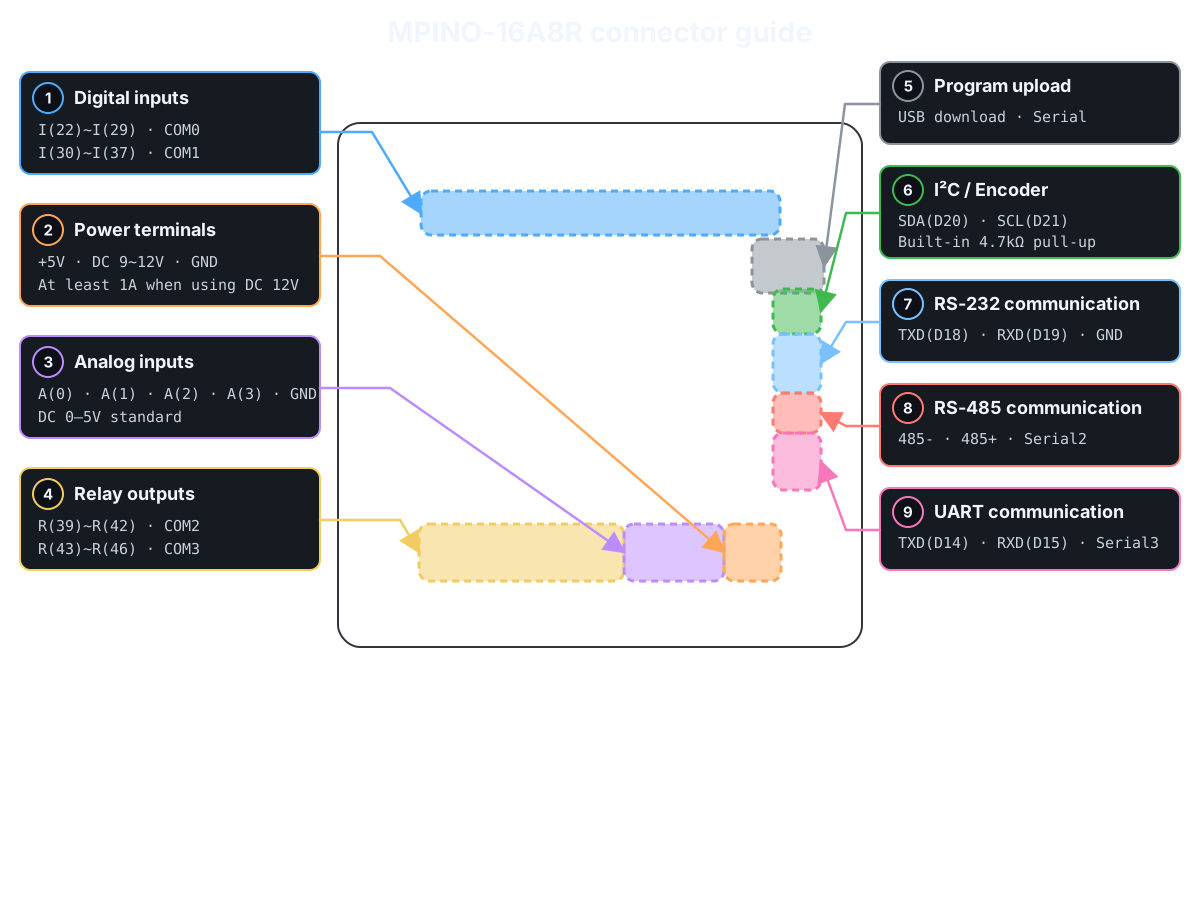
Product Specifications
| Category | Quantity | Terminal / Item | Specifications |
|---|---|---|---|
| Power | - | Supply voltage | DC 9~12V (1A or more when using DC 12V) |
| Digital inputs | 16 points (Solid-state, isolated) | I(22)~I(37) | operating input voltage: DC 0~40V HIGH detection voltage: DC 5V or higher input resistance: 2.2kΩ 8 points/1COM × 2 groups |
| Relay outputs | 8 points (Mechanical contacts, isolated) | R(39)~R(46) | operating connection voltage: DC 0~30V or AC 0~250V maximum allowable output current: 5A/1 point, 15A/1COM 4 points/1COM × 2 groups |
| Analog inputs | 4 points (Non-isolated) | A(0)~A(3) | Standard input: DC 0~5V, 10-bit (0~1023) Optional: DC 0~10V, 0(4)~20mA, NTC 10kΩ(25℃) input resistance: 100MΩ(0~5V), 200MΩ(0~10V), 250Ω(0(4)~20mA) |
| Interrupts Encoder | 1 channel (Non-isolated) | SDA(20) SCL(21) | input voltage: DC 0~5V Built-in 4.7kΩ pull-up resistor I²C cannot be used simultaneously with the encoder |
| Communication Channels | 1 channel (Non-isolated) | I²C | I²C master/slave supported Use SDA(20), SCL(21) |
| RS-232 | Use Serial1 Built-in Modbus RTU Master & Slave commands supported Built-in LS Industrial Systems Cnet commands supported |
||
| RS-485 | Use Serial2 Automatic direction control supported Built-in Modbus RTU Master & Slave commands supported Built-in LS Industrial Systems Cnet commands supported |
||
| UART | Use Serial3 Built-in Modbus RTU Master & Slave commands supported Built-in LS Industrial Systems Cnet commands supported |
||
| Memory | - | Flash | 256KB (including 8KB BootLoader) |
| SRAM | 4KB | ||
| EEPROM | 4KB |
Markdown file: Download MPINO-16A8R.md
Digital inputs
See the one-channel digital-input check before wiring for the first time. →
| Group | Terminal | Arduino Pin | Input Configuration | Terminals and Wiring Example |
|---|---|---|---|---|
| COM0 | I(22)~I(29) | D22~D29 | 8 digital inputs, sharing COM0 |  |
| COM1 | I(30)~I(37) | D30~D37 | 8 digital inputs, sharing COM1 |
The digital inputs are isolated by optocouplers and accept DC 5~24V NPN or PNP signals. Select the input type through the COM0·COM1 wiring polarity.
Example program · digital inputs
Use digitalRead() to display the D22~D37 input states every 200ms. HIGH is 1 and LOW is 0.
void setup() {
  Serial.begin(115200);
}

void loop() {
  for (uint8_t pin = 22; pin <= 37; pin++) {
    Serial.print(F("D"));
    Serial.print(pin);
    Serial.print(F(": "));
    Serial.println(digitalRead(pin));
  }
  delay(200);
}
Related built-in functions
Function example · consecutive-read filter: IdigitalRead()
Function prototype
bool IdigitalRead(uint8_t pin, uint8_t samples);
IdigitalRead(22, 5) reads D22 5 times consecutively. Update the state when all readings are HIGH or all are LOW; mixed readings retain the previous state. Unlike a time-based debounce filter, it inserts no delay between readings.
void setup() {
  Serial.begin(115200);
}

void loop() {
  const bool inputOn = IdigitalRead(22, 5);  // Read D22 five times consecutively and return the stable state
  Serial.println(inputOn ? F("D22 ON") : F("D22 OFF"));
  delay(200);
}
Function example · debouncing: Ibounce(), IbounceOn(), IbounceOff()
Function prototype
bool Ibounce(uint8_t pin, uint32_t debounceTime);
bool IbounceOn(uint8_t pin, uint32_t debounceTime);
bool IbounceOff(uint8_t pin, uint32_t debounceTime);
Compare three filters on the D22 input. Each returns the filtered ON/OFF state.
Ibounce(22, 30): Apply ON and OFF only after they remain stable for at least 30ms.IbounceOn(22, 500): Delay ON by 500ms; apply OFF immediately.IbounceOff(22, 500): Delay OFF by 500ms; apply ON immediately.
Each function operates independently, even on the same pin. Run the filters on every loop() iteration and display only the results at 200ms intervals.
unsigned long lastPrint = 0;

void setup() {
  Serial.begin(115200);
}

void loop() {
  const bool stable = Ibounce(22, 30);  // Filter D22 ON/OFF chatter over 30ms
  const bool onDelayed = IbounceOn(22, 500);  // Delay only D22 ON by 500ms; apply OFF immediately
  const bool offDelayed = IbounceOff(22, 500);  // Delay only D22 OFF by 500ms; apply ON immediately

  if (millis() - lastPrint >= 200) {
    lastPrint = millis();
    Serial.print(F("Ibounce: "));
    Serial.print(stable);
    Serial.print(F(", IbounceOn: "));
    Serial.print(onDelayed);
    Serial.print(F(", IbounceOff: "));
    Serial.println(offDelayed);
  }
}
Function example · input toggle: Ialt()
Function prototype
void Ialt(bool input, bool &state_var);
Ialt(input, state) inverts state whenever the input changes from OFF to ON. Pressing D22 once turns D39 ON; pressing again turns it OFF. Holding the input retains the state. The example debounces the input with Ibounce(22, 30) before passing it to Ialt(). outputOn is a global variable retained between calls, and Ialt() modifies it directly.
bool outputOn = false;

void setup() {
  Serial.begin(115200);
  digitalWrite(39, LOW);
}

void loop() {
  const bool previous = outputOn;
  const bool inputOn = Ibounce(22, 30);  // Filter D22 ON/OFF chatter over 30ms
  Ialt(inputOn, outputOn);  // Invert outputOn on an OFF→ON input transition
  digitalWrite(39, outputOn ? HIGH : LOW);

  if (outputOn != previous) {
    Serial.println(outputOn ? F("D39 ON") : F("D39 OFF"));
  }
}
STATUS LED
The MPINO-16A8R STATUS LED is an indicator mounted on the board. You can use it to show the operating state of your program.
The STATUS LED is connected to digital pin D13. In a sketch, use LED_BUILTIN in place of D13. Set pinMode(LED_BUILTIN, OUTPUT) before controlling it. digitalWrite(LED_BUILTIN, HIGH) turns the LED on; digitalWrite(LED_BUILTIN, LOW) turns it off.
Note: The STATUS LED is on the board and is separate from the external output terminals.
Example · Blink the STATUS LED
This example turns the STATUS LED on and off at 0.5-second intervals.
void setup() {
  pinMode(LED_BUILTIN, OUTPUT);
}

void loop() {
  digitalWrite(LED_BUILTIN, HIGH);  // LED on
  delay(500);
  digitalWrite(LED_BUILTIN, LOW);   // LED off
  delay(500);
}
Relay outputs
See the one-channel relay-output check before wiring for the first time. →
| Group | Terminal | Arduino Pin | Contact ratings | Terminals and Wiring Example |
|---|---|---|---|---|
| COM2 | R(39)~R(42) | D39~D42 | AC 250V or DC 30V, Max. 5A/1 point·15A/COM |  |
| COM3 | R(43)~R(46) | D43~D46 | AC 250V or DC 30V, Max. 5A/1 point·15A/COM |
Relay outputs are dry contacts that physically connect COM2 or COM3 to each output terminal. Connect a separate load power supply.
Example program · relay outputs
Map inputs D22~D29 to outputs D39~D46 in order. When an input is HIGH, its corresponding output turns ON.
void setup() {
  for (uint8_t pin = 39; pin <= 46; pin++) digitalWrite(pin, LOW);
}

void loop() {
  for (uint8_t ch = 0; ch < 8; ch++) {
    digitalWrite(39 + ch, digitalRead(22 + ch));
  }
}
Analog Input
| channel | Standard input | Option | Resolution | Connector Pinout |
|---|---|---|---|---|
| A(0)~A(3) | DC 0~5V | DC 0~10V 0(4)~20mA NTC 10kΩ(25℃) | 10-bit (0~1023) |  |
Select the analog input range by changing the product's resistor configuration.
Example program · analog inputs
Use analogRead() to display the ADC raw values (0~1023) of A0~A3. Each channel's voltage/current mode follows the actual product settings.
const uint8_t analogPins[] = {A0, A1, A2, A3};

void setup() {
  Serial.begin(115200);
}

void loop() {
  for (uint8_t ch = 0; ch < 4; ch++) {
    Serial.print(F("A"));
    Serial.print(ch);
    Serial.print(F(" ADC: "));
    Serial.println(analogRead(analogPins[ch]));
  }
  delay(500);
}
Related built-in functions
Function example · input range scaling: IanalogRead(), IanalogReadf()
Function prototype
int32_t IanalogRead(uint8_t ch, int32_t min, int32_t max);
float IanalogReadf(uint8_t ch, float min, float max);
Run this on products with A0 as the standard 0~5V input and A2 ordered as the 0(4)~20mA option. Both functions scale the ADC input to the specified min~max range. IanalogRead() returns an integer with the fractional part discarded; IanalogReadf() returns a floating-point value. This example displays the 0~5V input on A0 as both 0~100% and voltage. For the 0~20mA input on A2, specify a range of 0~20 to read the actual current.
void setup() {
  Serial.begin(115200);
}

void loop() {
  const int32_t percent = IanalogRead(A0, 0, 100);  // Scale A0 to an integer from 0~100%
  const float voltage = IanalogReadf(A0, 0.0f, 5.0f);  // Scale A0 to a floating-point voltage from 0~5V
  const float current = IanalogReadf(A2, 0.0f, 20.0f);  // Scale A2 to a floating-point current from 0~20mA
  Serial.print(F("A0: "));
  Serial.print(percent);
  Serial.print(F(" %, "));
  Serial.print(voltage, 2);
  Serial.print(F(" V, A2: "));
  Serial.print(current, 2);
  Serial.println(F(" mA"));
  delay(500);
}
Function example · 4~20mA range scaling: IanalogRead2(), IanalogRead2f()
Function prototype
int32_t IanalogRead2(uint8_t ch, int32_t min, int32_t max);
float IanalogRead2f(uint8_t ch, float min, float max);
Run this on products with A0 as the standard 0~5V input and A2 ordered as the 0(4)~20mA option. Scale a 4~20mA sensor input connected to A2 to a user-defined range. IanalogRead2(A2, 0, 100) returns an integer with 4mA mapped to 0% and 20mA to 100%. IanalogRead2f(A2, 4.0f, 20.0f) returns the current as a floating-point value. Below approximately 3.6mA, both functions return ANALOG_READ2_ERROR(65535); from approximately 3.6~4mA, they return the specified minimum.
void setup() {
  Serial.begin(115200);
}

void loop() {
  const int32_t percent = IanalogRead2(A2, 0, 100);  // Scale A2 4~20mA to an integer from 0~100%
  const float current = IanalogRead2f(A2, 4.0f, 20.0f);  // Convert A2 4~20mA to a floating-point current
  if (percent == ANALOG_READ2_ERROR ||
      current == (float)ANALOG_READ2_ERROR) {
    Serial.println(F("A2: 4-20mA input error"));
  } else {
    Serial.print(F("A2: "));
    Serial.print(percent);
    Serial.print(F(" %, "));
    Serial.print(current, 2);
    Serial.println(F(" mA"));
  }
  delay(500);
}
Function example · moving average: analogReadAvg(), analogRead2Avg()
Function prototype
int32_t analogReadAvg(uint8_t ch, uint8_t samples);
int32_t analogRead2Avg(uint8_t ch, uint8_t samples);
Run this on products with A0 as the standard 0~5V input and A2 ordered as the 0(4)~20mA option. analogReadAvg(A0, 5) returns a moving average of the raw A0 ADC readings (0~1023). analogRead2Avg(A2, 5) averages the corrected A2 4~20mA values (4mA=0, 20mA=32767). Each function accumulates up to 5 valid readings from recent calls; it does not take 5 readings in one call. The maximum samples value is 20. analogRead2Avg() returns ANALOG_READ2_AVG_ERROR(-1) for inputs below approximately 3.6mA.
void setup() {
  Serial.begin(115200);
}

void loop() {
  const int32_t voltageAvg = analogReadAvg(A0, 5);  // Moving average of up to 5 recent A0 ADC values
  const int32_t currentAvg = analogRead2Avg(A2, 5);  // Moving average of up to 5 recent corrected A2 4~20mA values
  Serial.print(F("A0 ADC average: "));
  Serial.print(voltageAvg);
  Serial.print(F(", A2 4-20mA average: "));
  if (currentAvg == ANALOG_READ2_AVG_ERROR) {
    Serial.println(F("input error"));
  } else {
    Serial.println(currentAvg);
  }
  delay(500);
}
Example program · temperature sensor inputs
Run this only on products ordered with A0 configured as an NTC input. Use analogRead() to display the temperature-sensor ADC raw value (0~1023) of A0. Celsius conversion is explained in the built-in functions below.
void setup() {
  Serial.begin(115200);
}

void loop() {
  Serial.print(F("A0 ADC: "));
  Serial.println(analogRead(A0));
  delay(500);
}
Related built-in functions
Function example · read NTC temperature: ntcRead(), ntcReadf()
Function prototype
int ntcRead(uint8_t ch);
float ntcReadf(uint8_t ch);
Run this only on products ordered with A0 configured as an NTC 10kΩ input. Read the temperature of the NTC 10kΩ (25℃), B=3950K sensor connected to NTC input A0. ntcRead() returns an integer equal to 10 times the Celsius temperature (25.3℃ → 253); ntcReadf() returns the Celsius temperature as a floating-point value (25.3). Both have a resolution of 0.1℃. Values outside the conversion range are clamped to -40℃ or 120℃, so do not use these values to detect an open or short circuit.
void setup() {
  Serial.begin(115200);
}

void loop() {
  const int temperature10 = ntcRead(A0);  // Return A0 temperature as an integer in Celsius ×10
  const float temperature = ntcReadf(A0);  // Return A0 temperature as floating-point Celsius
  Serial.print(F("ntcRead: "));
  Serial.print(temperature10);
  Serial.print(F(" (0.1 C), ntcReadf: "));
  Serial.print(temperature, 1);
  Serial.println(F(" C"));
  delay(500);
}
Interrupts / Encoder
| Function | Terminals / Arduino pins | channel |
|---|---|---|
| External interrupts | SDA(D20), SCL(D21) | 2 points |
| Encoder Inputs | Phase A: SDA(D20), phase B: SCL(D21) | 1 channel |
| I²C | SDA(D20), SCL(D21) | 1 channel |
SDA and SCL have built-in 4.7kΩ pull-up resistors. Encoder inputs and I²C use the same pins and cannot be used simultaneously.
Example program · pulse counting
Count FALLING edges on SDA(D20). The inputs have 4.7kΩ pull-ups (SDA/SCL). This software interrupt example reads the 32-bit value with ATOMIC_BLOCK and displays it every 500ms. Lossless counting is not guaranteed at the maximum input frequency. Because this uses SDA·SCL, do not run it simultaneously with I²C communication.
static_assert(digitalPinToInterrupt(SDA) != NOT_AN_INTERRUPT, "Invalid interrupt input");

#include <util/atomic.h>

volatile uint32_t pulseCount = 0;

void countPulse() {
  pulseCount++;
}

void setup() {
  Serial.begin(115200);
  // SDA is pulled up; count when the external signal pulls it to GND
  attachInterrupt(digitalPinToInterrupt(SDA), countPulse, FALLING);
}

void loop() {
  uint32_t snapshot;
  ATOMIC_BLOCK(ATOMIC_RESTORESTATE) {
    snapshot = pulseCount;
  }
  Serial.print(F("SDA pulses: "));
  Serial.println(snapshot);
  delay(500);
}
Example program · encoder inputs
Connect phase A to SDA(D20) and phase B to SCL(D21). This x1 counting example uses a 4.7kΩ pull-up (SDA/SCL) and increments when phase B is LOW at a FALLING edge. The actual rotation direction depends on the phase A/B wiring. Because this uses SDA·SCL, do not run it simultaneously with I²C communication.
static_assert(digitalPinToInterrupt(SDA) != NOT_AN_INTERRUPT, "Invalid interrupt input");

#include <util/atomic.h>
#include <stdint.h>

volatile int32_t position = 0;

void readEncoder() {
  // Increment if phase B is LOW at the phase A falling edge (x1 decoding)
  if (digitalRead(SCL) == LOW) {
    if (position < INT32_MAX) position++;
  } else {
    if (position > INT32_MIN) position--;
  }
}

void setup() {
  Serial.begin(115200);
  // Encoder phase A → SDA(D20), phase B → SCL(D21)
  attachInterrupt(digitalPinToInterrupt(SDA), readEncoder, FALLING);
}

void loop() {
  int32_t snapshot;
  ATOMIC_BLOCK(ATOMIC_RESTORESTATE) {
    snapshot = position;
  }
  Serial.print(F("Encoder: "));
  Serial.println(snapshot);
  delay(500);
}
Communication and Upload
| Function | Arduino Pin | Object | Device Wiring |
|---|---|---|---|
| USB Upload / Monitoring | D0(RX0), D1(TX0) | Serial |  |
| RS-232 | D19(RX1), D18(TX1) | Serial1 |
|
| RS-485 | D17(RX2), D16(TX2) | Serial2 |
|
| UART | D15(RX3), D14(TX3) | Serial3 |
|
| I²C | D20(SDA), D21(SCL) | Wire |
RS-485 uses automatic direction control, so no separate control pin is needed to switch between transmission and reception.
Example program · basic communication
Forward characters between Serial(115200bps) and RS-232 Serial1(9600bps, 8-N-1). Check the free space in the transmit buffer with availableForWrite(). Serial2 is RS-485 and Serial3 is TTL UART; when using those terminals, replace Serial1 in the example with the corresponding object.
// Serial Monitor via MP download cable ↔ RS-232 Serial1
void setup() {
  Serial.begin(115200);
  Serial1.begin(9600);  // Also configure the other device for 9600 bps, 8-N-1
}

void loop() {
  if (Serial.available() && Serial1.availableForWrite()) {
    Serial1.write(Serial.read());
  }
  if (Serial1.available() && Serial.availableForWrite()) {
    Serial.write(Serial1.read());
  }
}
Example program · I²C communication
Use Wire to scan addresses 0x08~0x77 and display responding addresses every 3 seconds. Do not run this simultaneously with encoder/interrupt examples that use SDA·SCL.
#include <Wire.h>

void setup() {
  Serial.begin(115200);
  Wire.begin();
  Wire.setClock(100000);
}

void loop() {
  uint8_t found = 0;
  for (uint8_t address = 0x08; address <= 0x77; address++) {
    Wire.beginTransmission(address);
    const uint8_t result = Wire.endTransmission();
    if (result == 0) {
      Serial.print(F("I2C: 0x"));
      if (address < 16) Serial.print('0');
      Serial.println(address, HEX);
      found++;
    }
  }
  Serial.print(F("Devices: "));
  Serial.println(found);
  delay(3000);
}
Example program · Modbus RTU communication
Related built-in functions
Function example · Modbus RTU Slave: ImodbusRTUMem(), ImodbusRTUAdr(), ImodbusRTUInit(), ImodbusRTU()
Function prototype
void ImodbusRTUMem(uint16_t m_size, uint16_t d_size);
void ImodbusRTUAdr(uint16_t m_offset, uint16_t d_offset);
void ImodbusRTUInit(HardwareSerial& serialPort, uint8_t slaveId, long baudrate);
void ImodbusRTU();
Store the D22 state in M[0] and the raw A0 reading (0~1023) in D[0] for the other device to read. Configure RS-232(Serial1), station 1, 9600bps, 8N1. Read M[0] with FC01, start address 0, quantity 1 bit; read D[0] with FC03, start address 0, quantity 1 word. Addresses are zero-based on-wire addresses. Call the communication function on every loop() iteration. This example does not control outputs.
M and D are shared global memory provided by the core. Run this sketch on its own. When combining protocols, do not allocate the shared memory more than once. For RS-485 terminals, replace Serial1 with Serial2; for UART terminals, use Serial3.
unsigned long lastPrint = 0;
bool memoryReady = false;

void setup() {
  Serial.begin(115200);
  ImodbusRTUMem(8, 8);  // Allocate 8 M bits and 8 D words
  ImodbusRTUAdr(0, 0);  // Set the M and D communication start addresses to 0
  ImodbusRTUInit(Serial1, 1, 9600);  // Start RS-232 at station 1, 9600bps
  memoryReady = (M != nullptr && D != nullptr);
  if (!memoryReady) Serial.println(F("Memory allocation failed"));
}

void loop() {
  if (!memoryReady) return;
  M[0] = digitalRead(22);
  D[0] = analogRead(A0);
  ImodbusRTU();  // Process incoming Modbus RTU requests

  if (millis() - lastPrint >= 1000) {
    lastPrint = millis();
    Serial.print(F("M[0]: "));
    Serial.print(M[0]);
    Serial.print(F(", D[0]: "));
    Serial.println(D[0]);
  }
}
Function example · Modbus RTU Master: ImodbusRTUmasterInit(), ImodbusRTUmaster()
Function prototype
void ImodbusRTUmasterInit(HardwareSerial& serialPort, long baudrate, uint8_t config);
uint8_t ImodbusRTUmaster(HardwareSerial& serialPort, uint8_t slaveId, uint8_t functionCode, uint16_t address, uint16_t quantity, uint16_t* data, uint16_t timeoutMs = 100);
Read one holding register from the remote slave over RS-232(Serial1) every 1 second. Configure the other device for station 1, 9600bps, 8N1, FC03, and on-wire start address 0. The response is stored in received[0] and displayed only on success. Error codes are displayed in hexadecimal. This is a separate sketch from the slave example above and uses a receive array instead of M/D memory. For RS-485 terminals, replace Serial1 with Serial2; for UART terminals, use Serial3.
unsigned long lastRequest = 0;
uint16_t received[1];

void setup() {
  Serial.begin(115200);
  ImodbusRTUmasterInit(Serial1, 9600, SERIAL_8N1);  // Start RS-232 as a Modbus master
}

void loop() {
  if (millis() - lastRequest < 1000) return;
  lastRequest = millis();
  const uint8_t result = ImodbusRTUmaster(Serial1, 1, 3, 0, 1, received, 200);  // Read 1 word at address 0 from station 1, timeout 200ms

  if (result == IMODBUS_RTU_SUCCESS) {
    Serial.print(F("Register 0: "));
    Serial.println(received[0]);
  } else {
    Serial.print(F("Modbus error: 0x"));
    Serial.println(result, HEX);
  }
}
Example program · LS Industrial Systems Cnet communication
Related built-in functions
Function example · LS Industrial Systems Cnet Slave: ICnetMem(), ICnetAdr(), ICnetInit(), ICnet()
Function prototype
void ICnetMem(uint16_t m_size, uint16_t d_size, uint16_t r_size = 100);
void ICnetAdr(uint16_t m_offset, uint16_t d_offset, uint16_t r_offset = 0);
void ICnetInit(HardwareSerial& serialPort, uint8_t slaveId, long baudrate);
void ICnet();
Store the D22 state in M[0] and the raw A0 reading (0~1023) in D[0] for an HMI to read. Configure the other device for LS Industrial Systems Cnet, RS-232, station 1, 9600bps, 8N1. Read the bit at %MX00000(M[0]) and the word at %DW0(D[0]). Call the communication function on every loop() iteration. This example does not control outputs.
M, D, and R are shared global memory provided by the core; this example does not use R. Run this separately from the Modbus example. When combining protocols, do not allocate the shared memory more than once. For RS-485 terminals, replace Serial1 with Serial2; for UART terminals, use Serial3.
unsigned long lastPrint = 0;
bool memoryReady = false;

void setup() {
  Serial.begin(115200);
  ICnetMem(8, 8, 0);  // Allocate 8 M bits and 8 D words; R is unused
  ICnetAdr(0, 0, 0);  // Set the M and D communication start addresses to 0
  ICnetInit(Serial1, 1, 9600);  // Start RS-232 at station 1, 9600bps
  memoryReady = (M != nullptr && D != nullptr);
  if (!memoryReady) Serial.println(F("Memory allocation failed"));
}

void loop() {
  if (!memoryReady) return;
  M[0] = digitalRead(22);
  D[0] = analogRead(A0);
  ICnet();  // Process incoming LS Cnet requests

  if (millis() - lastPrint >= 1000) {
    lastPrint = millis();
    Serial.print(F("M[0]: "));
    Serial.print(M[0]);
    Serial.print(F(", D[0]: "));
    Serial.println(D[0]);
  }
}